The best world clock for Windows, feature by feature
Open World Clock keeps multiple time zones on your desktop, one card for each city you care about. Each card follows its city’s real sunrise and sunset, and one scroll converts every clock at once. This is everything in version 1.3.0, and all of it is free, with no strings attached.
- Free, MIT licensed
- Windows 10 and 11
- Works offline
- No telemetry
Who’s awake, at a glance
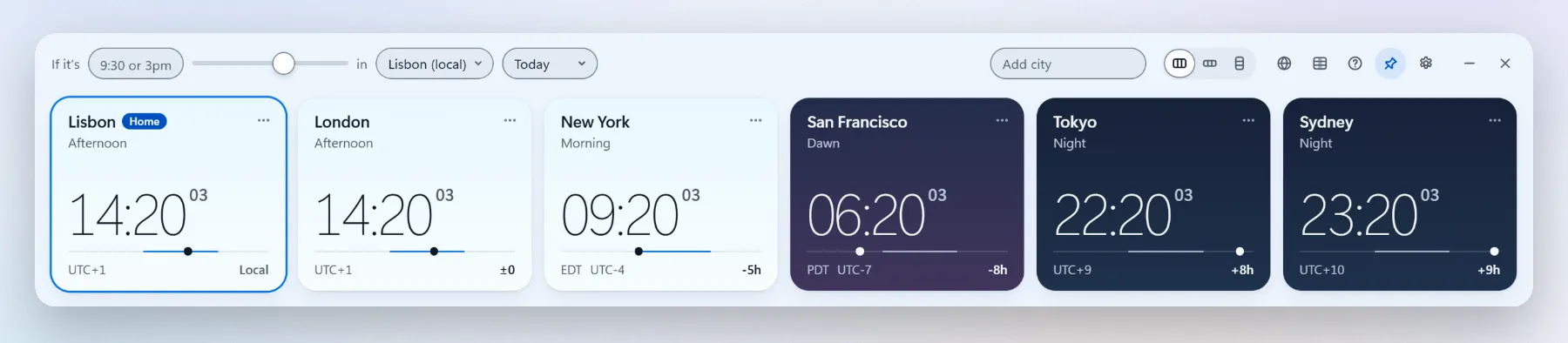
Every city gets a card with a big clock. The card’s sky comes from that city’s sun, not from a fixed hour, so one look tells you who’s at their desk and who’s asleep.
One card per city
Any IANA time zone works, including half-hour and 45-minute offsets. Each card shows the time, the date, the UTC offset and how far it is from your own clock.
Real sunrise and sunset
Cards turn to night at the actual sunset, worked out on your PC from each city’s coordinates. Hover a card to see today’s sunrise and sunset.
Seven phases of the day
Night, Dawn, Morning, Midday, Afternoon, Golden and Dusk, read from the height of the sun, with sky colors to match.
Clock-change notes
In the week before daylight saving time starts or ends, the card says so, for example “Clocks +1h tomorrow”.
Search that finds it
Look a city up by name, country, abbreviation (EST, CET) or offset (UTC-5, +3). Accents are optional, so Sao Paulo finds São Paulo.
Your own labels
Rename any card. Show America/Los_Angeles as “San Francisco”, or name a card after the teammate who lives there.
12 or 24 hours
Pick your clock format and whether to show seconds.
Convert any time
The converter sits in the top bar. Type a time and pick a city, or just scroll over a card. Every clock follows.
Type it your way
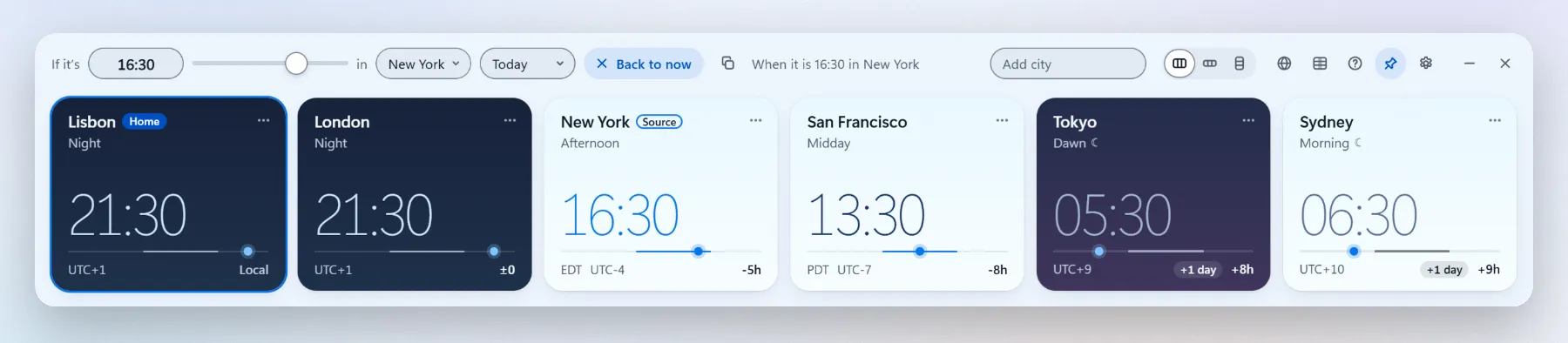
9, 9:30, 930, 9.30, 3pm or 15h30. Pick the city the time belongs to and every card shows the matching time.
Or scrub
Turn the mouse wheel over any card, or drag along its day line, to move every clock in 15-minute steps. Back to now puts them all back.
+1 day and -1 day
When the date is different somewhere, that card says so.
Likely asleep
While you convert, cities between 22:00 and 07:00 dim and get a moon.
Other days
Today, Tomorrow or one of the next five days by name, counted from the source city’s calendar.
Copy times
One click copies every converted time, ready to paste into a chat or an invite. The copy menu also has Copy for Discord, Copy in UTC and Save calendar invite.
Plan meetings across time zones
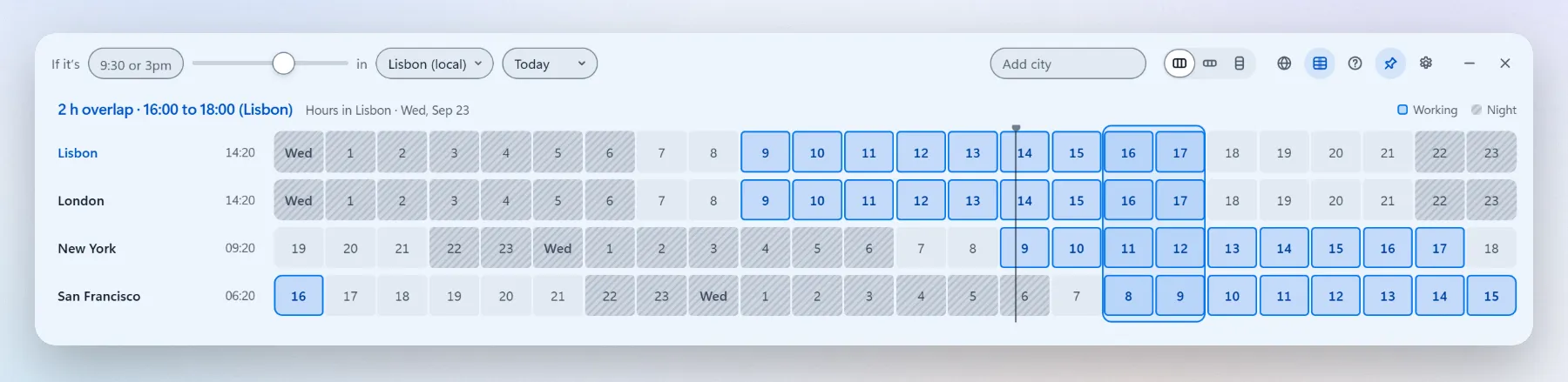
Open the planner and each city gets a 24-hour row. Working hours are blue, nights are dark, and the hours when everyone is at work are outlined.
Working hours per city
Every city starts at 09:00 to 18:00, Monday to Friday. Click its name to change the hours or the days.
Night shifts
Set an end time earlier than the start, like 22:00 to 06:00, and the shift runs into the next morning.
A summary you can read
The top line says it plainly: “4 h overlap · 14:00 to 18:00 (Lisbon)”, or “No overlap”.
Best hours when nobody overlaps
With no shared hour, the planner outlines the hours when the most cities are at work, for example “Best: 12:00 to 13:00 (New York), 4 of 5 working”. Its tooltip names who is outside their hours.
Pick an hour, convert everything
Click an hour in the grid and every clock jumps to it. Drag across hours, or hold Shift and use the arrow keys, to pick a longer slot, then copy it or save it as a calendar invite.
The world map
Switch to the map to see where it’s day and night right now, and where each of your cities sits.

Day and night, live
Night is shaded with a soft twilight edge, and it moves as the minutes pass.
Where the sun is
A small sun marks the spot where it’s directly overhead right now.
Your cities, pinned
Each city on your list gets a pin with its name and time. Click one to convert from it.
Follows the converter
Scrub to another time and the night moves with you.
Made for your desk
A small window that stays out of the way until you need it.
Three layouts
Strip, compact or vertical, switched from the top bar. Each one remembers its own size.
Stays on top, if you want
Pin it above every window, or let it sit with the rest.
Frameless and translucent
Set the background opacity to taste. On Windows 11 it gets Snap and the native acrylic backdrop.
Always where you left it
A tray icon, optional launch at login, and it reopens in the same place, on any monitor.
Themes and languages
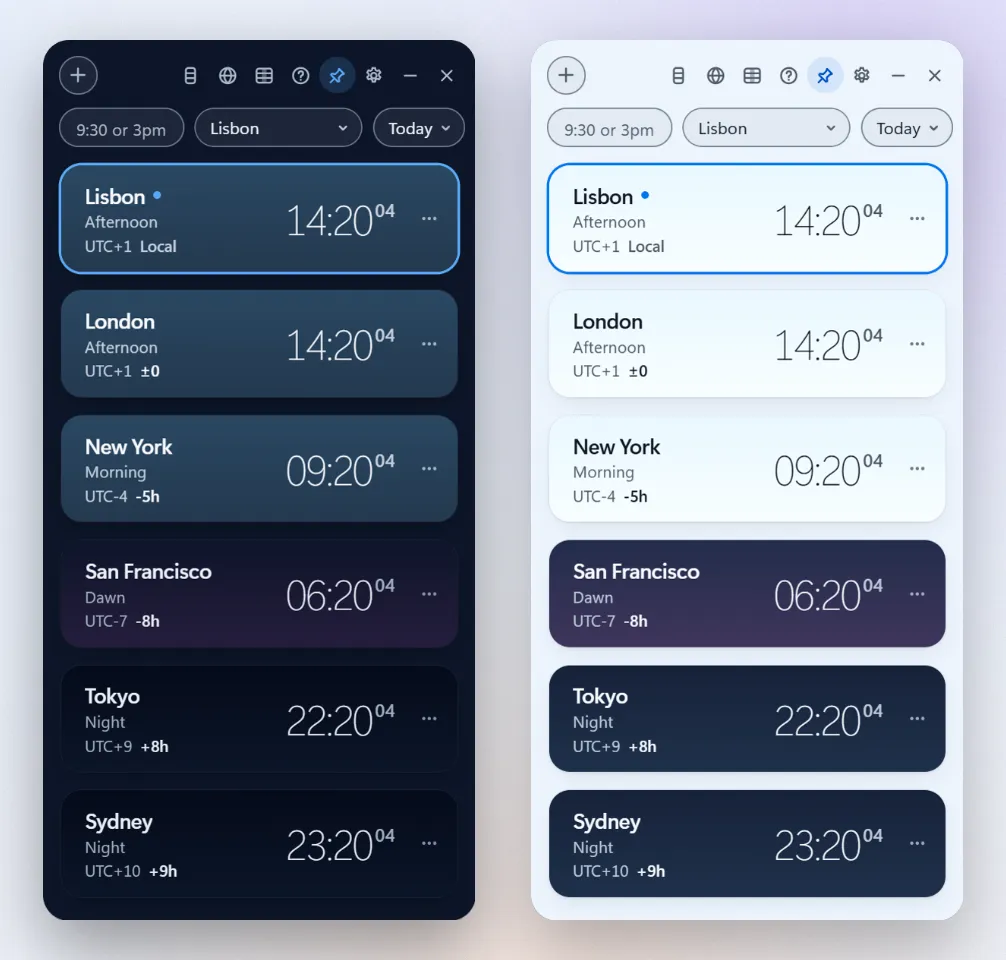
Light, dark or Windows
Follow the Windows setting, or pick one.
Three languages
English, Portuguese and Spanish, taken from your Windows display language or set by hand. City and country names are translated too.
Motion that listens
Animations switch off when Windows animation effects are off.
12 or 24 hours, from Windows
On first run the clock follows your Windows Region format: 12-hour for English (United States), 24-hour for Portuguese (Brazil). Change it any time in Settings.
Zoom to 200%
Press Ctrl + + and Ctrl + -, or hold Ctrl and turn the mouse wheel, to zoom from 100% to 200%. Ctrl + 0 resets it. The window grows with it, so the layout keeps its shape, and the zoom is remembered.
Keyboard and screen readers
Everything works without a mouse. On a focused city card:
- Enter
- Convert from that city
- [ and ]
- 15 minutes earlier or later
- Page Up Page Down
- 1 hour later or earlier
- Alt + arrow keys
- Move the card
- F2
- Rename it
- Delete
- Remove it
- Shift + F10
- Open its options
Conversions and changes are announced to screen readers, every control has a label, and keyboard focus always has a visible ring.
Private, free and open source
Nothing leaves your PC
No account, no ads, no telemetry. The app makes no network requests of its own, so it works offline.
One settings file
Your cities, labels, working hours and preferences live in
%APPDATA%\Open World Clock.MIT licensed
Free, with no in-app purchases. The source is on GitHub for anyone to read.
Left out on purpose
A world clock that does one job well stays quick and light.
- Weather. It would need the internet, and the app works offline.
- Alarms, timers and a stopwatch. The Clock app that comes with Windows already does these well.
- Other platforms, for now. It’s Windows only. An iPhone version with widgets is in the works, with no date yet.
More about Open World Clock
Put the world on your desktop
Completely free for Windows 10 and 11. Open source, no account, no ads, no telemetry.